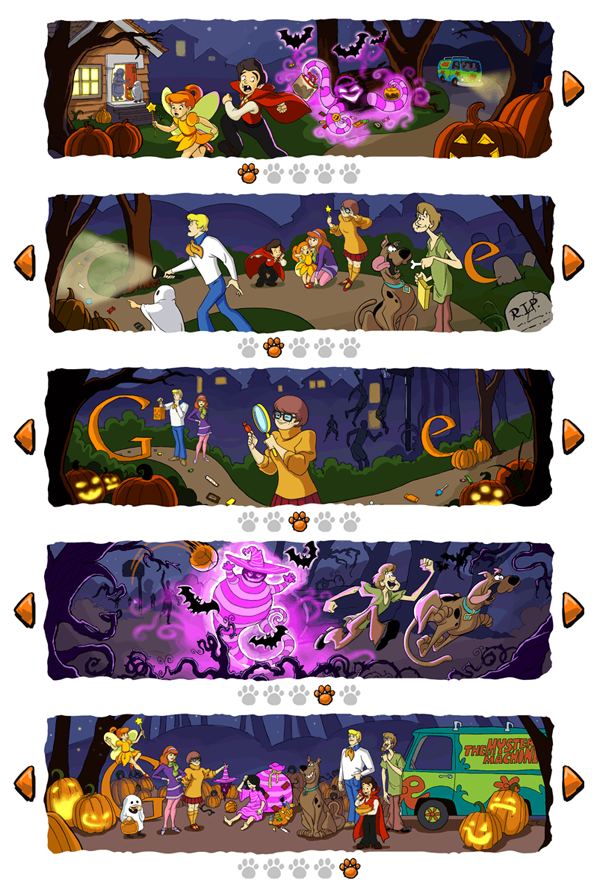
Looks like today’s Google logo “Happy Halloween featuring Scooby Doo!” is the first time they’ve used a carousel to paginate. Fittingly, it’s like flipping through a Sunday morning comic strip and brings back some great memories from when I used to watch Scooby Doo every weekend which always ended with “…and I would’ve gotten away with it if it wasn’t for you meddling kids!” From a customized game of Pac-Man to an embedded YouTube video for John Lennon’s birthday, Google has been creating more and more innovative “Doodles.” Check out the entire doodle collection.
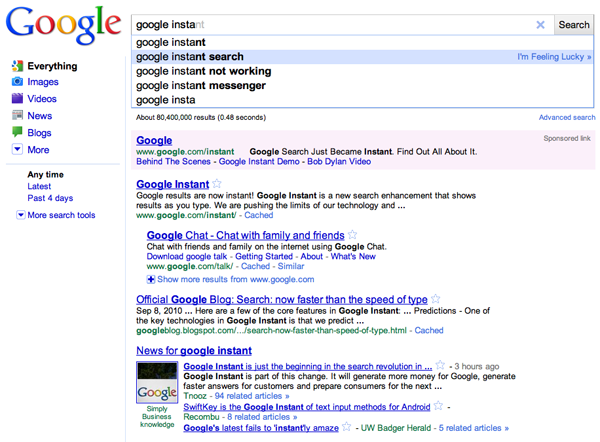
By now, you’ve probably heard, seen, or used Google’s new search interaction, Google Instant. Quick recap: Instant progressively shows results as the user types a query and refreshes results as the user adds each additional character, all the while, providing suggested searches. Here are the benefits Google says will be gained by using Instant:
Faster Searches: By predicting your search and showing results before you finish typing, Google Instant can save 2-5 seconds per search.
Smarter Predictions: Even when you don’t know exactly what you’re looking for, predictions help guide your search. The top prediction is shown in grey text directly in the search box, so you can stop typing as soon as you see what you need.
Instant Results: Start typing and results appear right before your eyes. Until now, you had to type a full search term, hit return, and hope for the right results. Now results appear instantly as you type, helping you see where you’re headed, every step of the way.
I’ve noticed that i’ll keep typing my search even though the correct suggestion is right underneath. The 1st suggestion would be shown in gray in the main search bar, and I would dictate to that like I’m playing a typing game.
I have a habit of pressing ‘Enter’ after a search even when the result is already shown. I feel that when Instant suggests what I might be looking for in the field but I haven’t finished typing the entire query, pressing ‘Enter’ should default to the suggested query.
Refreshing results with each additional character is extremely fast.
There should be some type of hotkey to activate the “I’m Feeling Lucky” feature during a search.
I can’t wait to see if Instant will roll out on Google’s other features, especially maps and images. Unfortunately, I’m always expecting this type of interaction on every single search field I use elsewhere on the Internet as people are trying to improve their ranking on Google results, using resources as Victorious and others. But some clever devs have made their own home-brewed versions to work on other services like YouTube and iTunes.