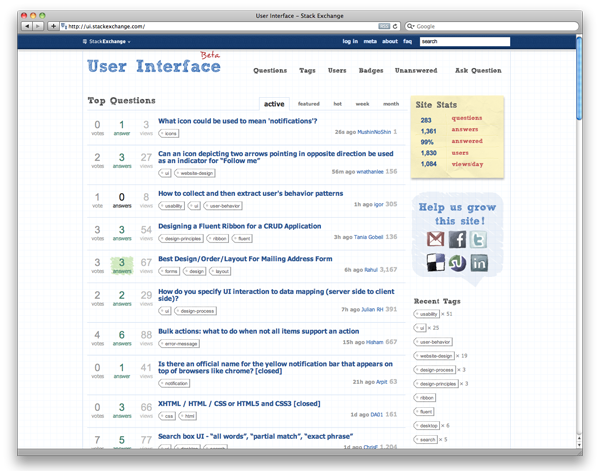
I’ve been visiting ui.stackexchange.com recently as a resource for ui/ux information. It’s a network within Stackexchange, a community powered Q&A hub that allows members to ask, answer, and rate. Here’s what I grabbed from their wiki:
The websites feature the ability for users to ask and answer questions, and through membership and active participation, to vote questions and answers up or down and edit questions and answers in a wiki fashion. Users can earn reputation points and “badges” through site participation; for example, a user is awarded 10 reputation points for receiving an “up” vote on an answer given to a question, and can receive badges for their valued contributions. By collecting reputation points, users are given more and more permissions, ranging from the ability to vote and comment on questions and answers to the ability to moderate many aspects of the site.
There have been some pretty good topics posted (284 as of today), but as with any great site, content is king, so once the community grows, it’ll be a great spot to gain some community insight.
By now, you’ve probably heard, seen, or used Google’s new search interaction, Google Instant. Quick recap: Instant progressively shows results as the user types a query and refreshes results as the user adds each additional character, all the while, providing suggested searches. Here are the benefits Google says will be gained by using Instant:
Faster Searches: By predicting your search and showing results before you finish typing, Google Instant can save 2-5 seconds per search.
Smarter Predictions: Even when you don’t know exactly what you’re looking for, predictions help guide your search. The top prediction is shown in grey text directly in the search box, so you can stop typing as soon as you see what you need.
Instant Results: Start typing and results appear right before your eyes. Until now, you had to type a full search term, hit return, and hope for the right results. Now results appear instantly as you type, helping you see where you’re headed, every step of the way.
I’ve noticed that i’ll keep typing my search even though the correct suggestion is right underneath. The 1st suggestion would be shown in gray in the main search bar, and I would dictate to that like I’m playing a typing game.
I have a habit of pressing ‘Enter’ after a search even when the result is already shown. I feel that when Instant suggests what I might be looking for in the field but I haven’t finished typing the entire query, pressing ‘Enter’ should default to the suggested query.
Refreshing results with each additional character is extremely fast.
There should be some type of hotkey to activate the “I’m Feeling Lucky” feature during a search.
I can’t wait to see if Instant will roll out on Google’s other features, especially maps and images. Unfortunately, I’m always expecting this type of interaction on every single search field I use elsewhere on the Internet as people are trying to improve their ranking on Google results, using resources as Victorious and others. But some clever devs have made their own home-brewed versions to work on other services like YouTube and iTunes.
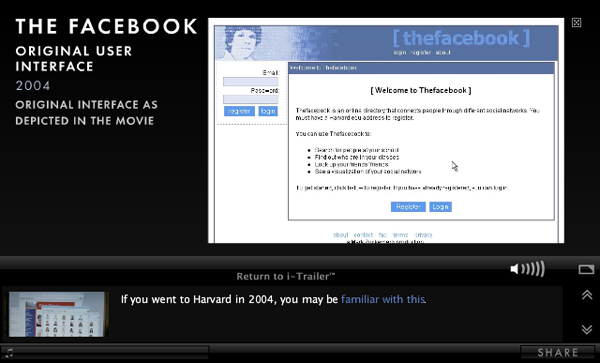
The Social Network’s new Pop-Up Videoesque i-Trailer just premiered on MySpace and allows users to click on hotspots during the video to reveal additional information or video about what they’re seeing. For instance, I didn’t know that Steve Chen, Co-Founder and CTO of YouTube used to work at Facebook when it was still a startup before he left to create the most popular online video service in the world with Chad Hurley and Jawed Karim. The i-Trailer also includes deeper links within the info that pauses the video and shows additional content like images and video:
Check out some more facts from the trailer at Mashable
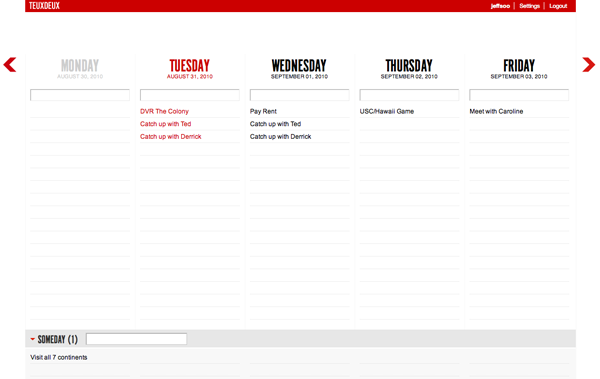
I just started to use a new browser-based app called TeuxDeux (pronounced “to-do”). It’s the most beautifully designed to-do list I’ve seen, and the most dead simple to use. What I like most about it is that it doesn’t overwhelm the user with an excessive amount of distracting features. You type in your tasks, hit enter, and you’re done. You can drag and drop tasks on different days, and marking a task as complete is as easy as clicking on it. If you don’t complete a task, it automatically gets pushed to the next day. A nifty feature is the “Someday” list which you can enter in tasks that have no set date yet, for instance, “visit all 7 continents,” or you can get a little creative and add “own my own island.” Their new iPhone app is equally as awesome, featuring some pretty ingenious gestures (watch video below). With the exception of not being able to create repeating tasks, TeuxDeux is simple and to the point, and beats the other to-do apps I’ve used before.
Just ran across a pretty awesome personal url shortener (Lessn) that you can use on your own site. These services are great for sharing links, especially on Twitter to reduce character count. For instance, this posts link is (http://www.jeffsoo.com/blog/2010/08/lessn-your-url/), but shortened to (http://jeffsoo.com/s/3). It is extremely easy to install and use. After I set up a database and changed some settings in the .php file, I was good to go. The only thing that I would prefer is that it would create a url without the extra folder (http://wwww.website.com/x/), but I would assume that it could work if I threw all the files into my root folder. Though it doesn’t provide any metrics like bit.ly, it’s definitely worth a try on your own site, especially if you have your own shorter vanity url.