Posted: October 11th, 2012 | Author: Jeff Soo | No Comments »
According to one survey, the biggest threat is careless employees who don’t follow security policies. Unfortunately, not all employees are making the necessary changes. What’s more, many organizations have no ability to prevent a bad employee from doing something bad. All they can do is watch him or her. For a company, bad behavior is bad business. After a while, the bad employee must be fired. Some companies invest time and resources to help their employees avoid bad acts. These are effective in deterring employees from trying to steal information. Unfortunately, some companies only focus on meeting sales targets. In this case, it’s much harder for a company to hold an employee accountable for his or her bad behavior.

Good management can prevent the bad behavior, but usually the problem is not enough management, rather a lack of it. As with companies, some people have more control than others, and are able to cause the most harm. If you feel you are becoming a target of these types of crimes, you might want to consider a security consultant’s opinion. Security consultants are trained to understand security threats and to deal with them before they escalate into attacks. A security consultant will assist you to assess and strengthen your security posture. This will help you create well-defined procedures to ensure your organizations are protected from future security threats. You should also consider the employment and credentials of your employees and all the security measures you have in place. Workplace, information security and law enforcement agencies are interested in all companies or individuals who are recruiting for jobs. If you are involved in a project that requires your security, consider asking for the services of a qualified consultant to help you with those tasks. For example, the use of firewalls, proper information storage and distribution, and antivirus software can only help you protect your projects from security threats.
What will I need in order to secure my applications and networks? In order to protect your network and applications you will need three items: an anti-virus software, a remote access firewall, VPNs and IPS (learn more at this
helpful site). Firewalls, VPNs and IPS are all security features that help protect you from attackers. Here are some examples of security applications you should have installed: firewall This is the server that routes incoming connections to the devices. firewall This is the server that keeps out malicious traffic Internet Firewall: This enables you to determine whether a connection should be allowed or denied. If the traffic is allowed you will be allowed to access the resource. The server enables your devices to communicate with the internet. There is only one IP address for a physical connection and therefore the access firewall must be assigned to one unique IP address. Remote Access: This application allows your desktop and other computer to communicate with the firewall, VPN and ISP. It is ideal for workstations that do not have an Ethernet port. It allows you to connect to the firewall and also allow applications and media to access your computer. You will need a secure connection, e.g., managed wifi, to ensure that network is secure. Check out sites like
https://www.eatelbusiness.com/managed-wifi/ to learn more. Security Certificate: It provides an authentication service for authentication of your users and your apps. To help you with all of these security features, you can hire managed IT services for your business.
Get more Info here.
Posted: October 31st, 2010 | Author: Jeff Soo | No Comments »
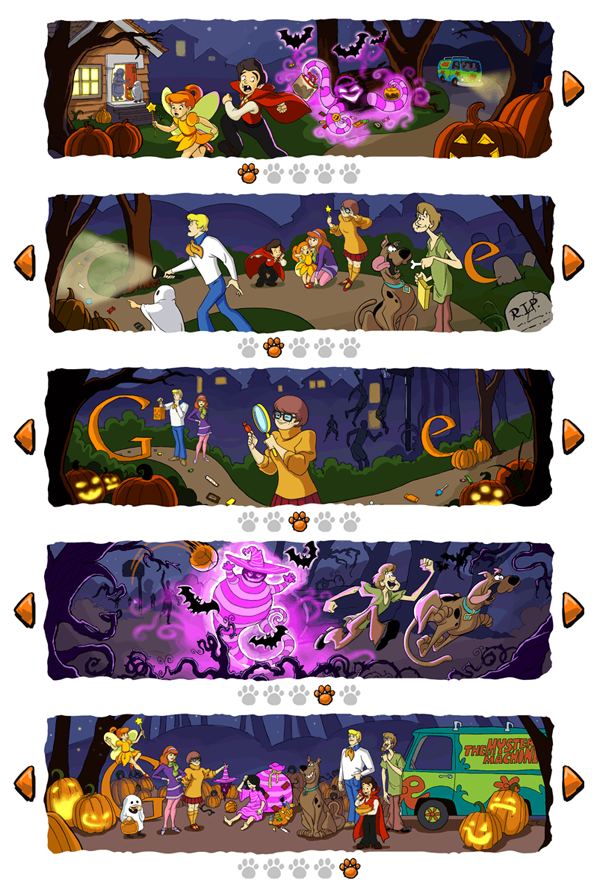
Looks like today’s Google logo “Happy Halloween featuring Scooby Doo!” is the first time they’ve used a carousel to paginate. Fittingly, it’s like flipping through a Sunday morning comic strip and brings back some great memories from when I used to watch Scooby Doo every weekend which always ended with “…and I would’ve gotten away with it if it wasn’t for you meddling kids!” From a customized game of Pac-Man to an embedded YouTube video for John Lennon’s birthday, Google has been creating more and more innovative “Doodles.” Check out the entire doodle collection.
Posted: October 21st, 2010 | Author: Jeff Soo | 7 Comments »

YouTube has started rolling out a subtle new feature in embedded video players. At anytime you push pause, you’ll see a new arrow icon that, when clicked, will open the deep-link for the YouTube page the video lives on in a new window or tab. Because it’s the same size as the play button, it might take away from the prominent call-to-action to resume playback. So far, I’ve only seen it on the newer player UI, and is most likely not planned to be implemented in the older players, but it’s definitely a great feature.
Posted: October 19th, 2010 | Author: Jeff Soo | 1 Comment »

My friends have launched their “travel inspiration” service Wanderfly today. Co-founded by Evan Schneyer, Christy Liu, and Cezary Pietrzak, “Wanderfly answers this basic question: ‘Where can I go?'” This guide shows you even more places to visit in Australia
Just enter your departure city, budget, approximate time frame, location (if you know a general vicinity, i.e., “Europe,” or you can be completely spontaneous and leave it defaulted to “Anywhere”), and interests (casino, eco, food, culture, outdoors, romance, shopping, spa, party, beach, entertainment, and/or luxury). “Get Going,” and the system will recommend custom-tailored locations along with flight and hotel options and a collection of things to do pulled in from services such as Foursquare, Yelp, Eventful, Nile Guide, Find. Eat. Drink, and Lonely Planet.
Posted: September 29th, 2010 | Author: Jeff Soo | No Comments »
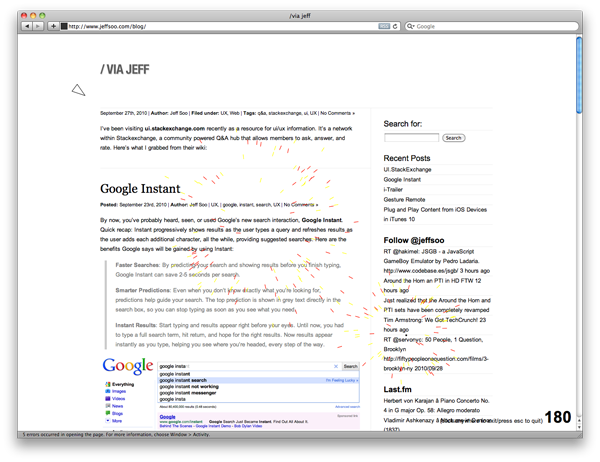 Stumbled upon this awesome browser “game” while reading Gizmodo. It’s like a game of Asteroids on most any webpage where you shoot up objects on the site – just drag-and-drop the javascript code into your bookmarks menu, visit a site, and launch the code. You steer your ship with the arrow keys, and shoot with the spacebar. Like it says on the site, “it’s cooler if you make your own sound effects.” Have fun!
