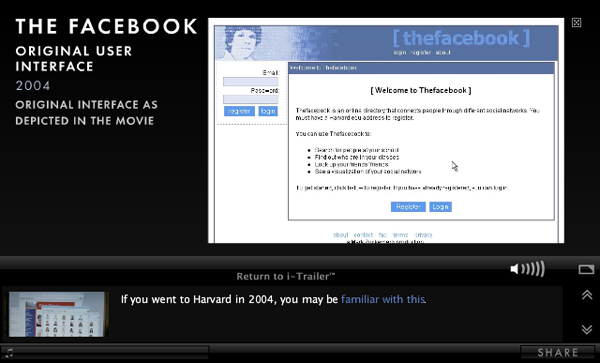
The Social Network’s new Pop-Up Videoesque i-Trailer just premiered on MySpace and allows users to click on hotspots during the video to reveal additional information or video about what they’re seeing. For instance, I didn’t know that Steve Chen, Co-Founder and CTO of YouTube used to work at Facebook when it was still a startup before he left to create the most popular online video service in the world with Chad Hurley and Jawed Karim. The i-Trailer also includes deeper links within the info that pauses the video and shows additional content like images and video:
Check out some more facts from the trailer at Mashable
iTunes 10 is a major release from Apple. In past updates to the application, Apple introduced only new features, but this is the first in a while where the company made some radical interface changes. The most extreme change is most notably the new dock icon, which strangely reminds me of the Windows start icon. Surely, there’s a good reason to back up the change – transition from CDs to all-digital format. But was it a good idea to change something already so memorable and associated with the iTunes brand? Since iTunes was released in 2001, the icon has consistently been a musical note on top of a compact disk. I have to admit, I haven’t been launching the app from the dock as often because my mind’s still not relating the icon to iTunes. There has been such buzz about the redesign, people have started to design their own versions and swapping them out on their own systems. Hell, there’s even a Twitter account (@itunes10icon) comically defending the change.
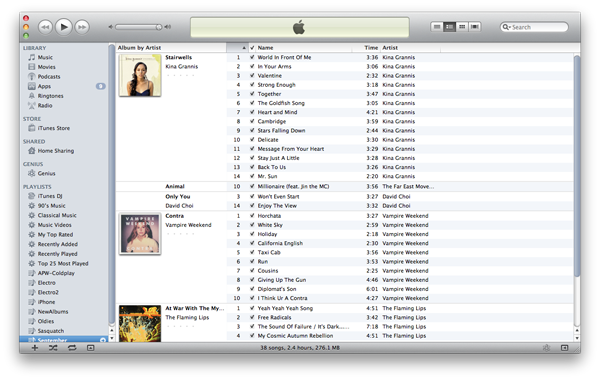
One of the newest features is a new album view that lets users see the cover of the album, in an effort to reduce redundant album titles. This view seems to only be ideal if I only have albums in my library, but in the scenario in the screenshot above, it clearly raises some issues if I only have 1 or 2 songs from an album. If there is only 1 song, only the album title is listed; 2-4 songs will show the title and artist; and the cover would only be seen if the user has at least 5 songs from that album. Chunking and drawing focus to the album and artwork, I would unnoticeably skip over the tracks that don’t have artwork because they don’t seem as important. I did notice however that this view was the default for Library, but when I changed to another playlist, I was in list view, which was a relief because my playlists don’t usually have entire albums. There is one feature that I think has the most value in this view: the ability to edit artist name or album title in-line, and have those changes apply to the entire album listing. I used to have to highlight all the tracks I wanted to edit, get info, make the changes and press apply, so reducing the workflow by more than half, makes this view a lot more useful to the user.
There have been some subtle UI changes made as well. There’s a new fatter volume bar with a shiny brushed aluminum-like scrubber, which seem to be the only instance of this type of design treatment in the entire app. One of the most obvious is the vertical layout for window controls (Close, Minimize, Maximize). Now more like a traffic light, it makes the entire application seem like it doesn’t belong to OS X, rather, like a third-party app. Because every other application running in the OS has these controls laid out horizontally, this new placement throws off the user’s perception of what they’re already used to. Maybe this is just a taste of what Apple has ready to roll out in their next OS release. There is, however, a way to revert back to the original placement:
The iconography in the left navigation has also made a minimal change. Originally, the icons were in color, and seemed to be more active and selectable. Desaturating the icons to be monochromatic makes these categories look inactive and inaccessible. They do make the application look a little more sophisticated and more content-centric in that color appears in only cover art and store images. Again, could this be a change that will be reflected in a future release of Mac OS, for instance, desaturated icons in the finder?
I went back to explore Ping, and quickly noticed that the modal that overlays when images and videos are selected is new. Instead of the dark-and-black lightbox-esque pop-up you would get when watching a trailer in the iTunes Store, this pop-up is white and has a glass-like border, reminiscent of Windows Vista and 7.
When you get to the bottom of the feed, you see text for “More…” but being used to expanding feed interactions like Facebook’s or Twitter’s, I’m expecting more content to either auto-populate when I scroll down, or have an obvious button that I can click to initiate the process. iTunes doesn’t have any type of visual clue to let the user know that text is clickable. Links are blue in Ping, but not anywhere else in the iTunes Store.
Finally, I decided to plug my iPhone in to test “improved syncing.” Visually, the capacity bar is better than it was before. The previous bar was embossed and split up in segments, which I thought was useless and added unnecessary cognitive load.
The process of syncing has also made a minor change. There is now contextual confirmation that shows “Step # of 5,” reaffirming where in the process funnel the user is. Though syncing is an automated process where the user cannot navigate backwards and forwards through (only cancel), it’s nice to let them know what’s going on in the automation, and provide some clues to allow them to predict time until completion.
Overall, there are both negative and positive changes in iTunes 10, unfortunately, more of the former than the latter. There is definitely a drive to keep innovating software at Apple, but there seems to be some disconnect when unifying all of the elements that make up one product. Sure there must be different teams working on various features (iTunes Store, App Store, Ping), but they need to design more uniformly and strictly enforce a style guide to create better usability. Have you given the new update a try yet? What do you think of the new version of iTunes?
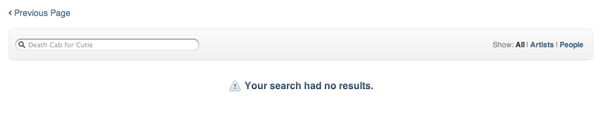
I was pretty excited to update to iTunes 10 after seeing some new UI updates and features. Aside from some interface changes (I’ll save that for another post), I wanted to get started on Ping, Apple’s “social network for music.” And then I started catching up my Twitter feed to see a few running posts by @Scobleizer pointing out one significant flaw with Ping: Artist discovery. I couldn’t believe the names he was tweeting: Black Eyed Peas, Daft Punk, Madonna… So I gave it a try as well, searching around 15 headline-caliber artists, and what do you know? “Your search had no results.”
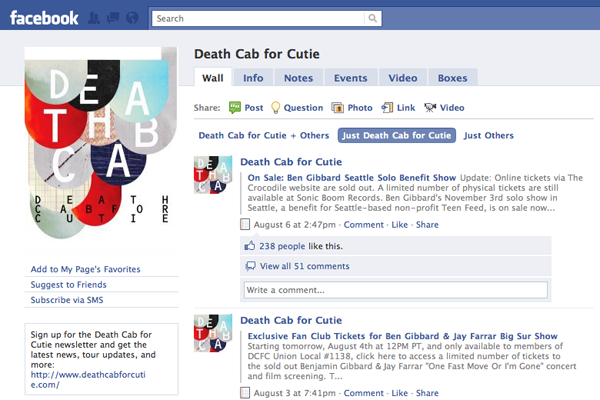
Was it too early to release Ping? Should Apple have waited a while to get more artists onboard? Definitely. After registration, Ping recommended only 12 artists to me, and I only chose 2 or 3 to follow. On top of that, I’ve been reading Facebook Connect has been axed (for now) due to “onerous terms.” On the contrary, there are features that are pretty useful – concert tickets, especially. I’ve read reports that Apple was working on a partnership with LiveNation, but after clicking on the tickets link for a Jack Johnson concert, I was redirected to Ticketmaster.com. If in-app ticket purchasing is in the horizon, I could see it being a useful tool. We’ll see what happens in a few months, but for now, Facebook Pages, with a larger database of artists and essentially offering the same content, is shining.
Facebook’s friend-finding API is generally open access, but anyone that wants to hit it an extreme number of times has to sign a deal agreeing to protect Facebook user data and limit network impact. Given the sheer size of the iTunes customer base, it’s no surprise that Facebook wanted such a deal, but apparently negotiations broke down — possibly over what Steve Jobs referred to as “onerous terms” — and Apple decided to just go ahead and use the API anyway.
Last night my friends Wong Fu Productions held their 1st east coast installment of International Secret Agents. The final headliner was recently signed artists Far*East Movement, but what stood out to me was the little bit of audience participation they had before they went on (watch video below). The gist is: you call a number shown and appear as a blob on the screen with your phone number. The louder you scream into your phone, the larger your blob would get. At the end, they gave out prizes to whoever won. I’ve seen plenty of audience participation at events before, but never like this. Usually they would be texting to receive additional info, or getting a message shown on the jumbo-tron. I have no idea what this service is called, but I would definitely like to know, so if you or anyone knows, please leave a reply or send any sales tips you have!
Just ran across a pretty awesome personal url shortener (Lessn) that you can use on your own site. These services are great for sharing links, especially on Twitter to reduce character count. For instance, this posts link is (http://www.jeffsoo.com/blog/2010/08/lessn-your-url/), but shortened to (http://jeffsoo.com/s/3). It is extremely easy to install and use. After I set up a database and changed some settings in the .php file, I was good to go. The only thing that I would prefer is that it would create a url without the extra folder (http://wwww.website.com/x/), but I would assume that it could work if I threw all the files into my root folder. Though it doesn’t provide any metrics like bit.ly, it’s definitely worth a try on your own site, especially if you have your own shorter vanity url.

 The most extreme change is most notably the new dock icon, which strangely reminds me of the Windows start icon. Surely, there’s a good reason to back up the change – transition from CDs to all-digital format. But was it a good idea to change something already so memorable and associated with the iTunes brand? Since iTunes was released in 2001, the icon has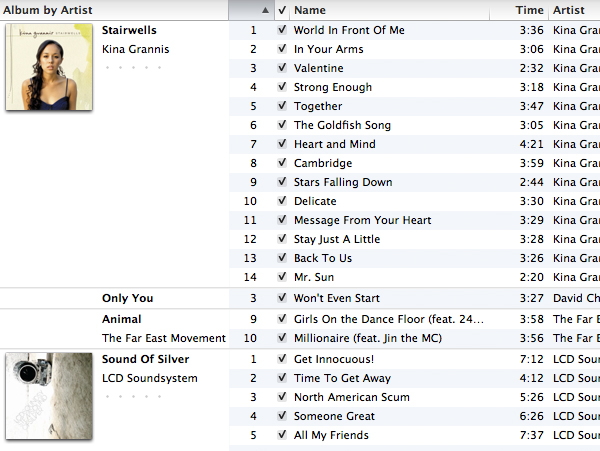

 The iconography in the left navigation has also made a minimal change. Originally, the icons were in color, and seemed to be more active and selectable. Desaturating the icons to be monochromatic makes these categories look inactive and inaccessible. They do make the application look a little more sophisticated and more content-centric in that color appears in only cover art and store images. Again, could this be a change that will be reflected in a future release of Mac OS, for instance, desaturated icons in the finder?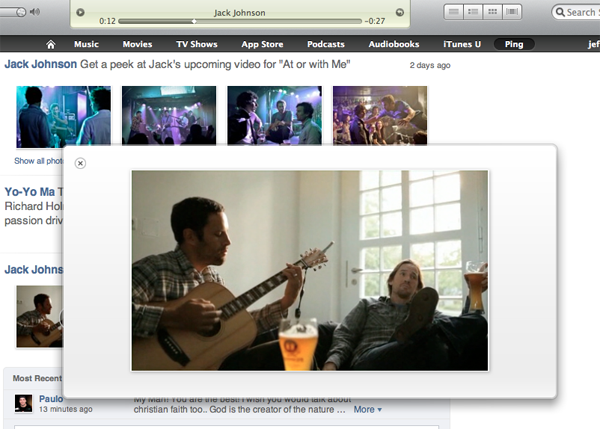
 When you get to the bottom of the feed, you see text for “More…” but being used to expanding feed interactions like Facebook’s or Twitter’s, I’m expecting more content to either auto-populate when I scroll down, or have an obvious button that I can click to initiate the process. iTunes doesn’t have any type of visual clue to let the user know that text is clickable. Links are blue in Ping, but not anywhere else in the iTunes Store.